Containerlab Service Deploy Netbox Task¤
task api name:
deploy_netbox
Containerlab service deploy_netbox task deploys network topologies using device data retrieved from NetBox. The task fetches nodes and links from NetBox, builds a Containerlab topology file, organizes it into the worker topology directory, and runs containerlab deploy with the requested options.
Containerlab Deploy Netbox Task Overview¤
The deploy_netbox task provides the following features:
-
Automated Topology Deployment: Deploys a topology using nodes and links sourced from NetBox with one of these selection methods:
- NetBox Devices List - use provided device names to construct topology and deploy lab
- NetBox Tenant - source devices for a tenant and deploy the lab
- NetBox Device Filters - fetch device data from NetBox GraphQL API and deploy the lab
-
Topology Links Sourcing - forms links using NetBox device connections and circuit data.
- NetBox Branches: Reads devices and links from a named NetBox branch when
branchis supplied. The NetBox service creates the branch if it does not exist and bypasses its inventory cache for branch reads. - Reconfiguration: Supports reconfiguring an already deployed lab.
- Node Filtering: Allows deploying specific nodes using a filter.
How It Works¤
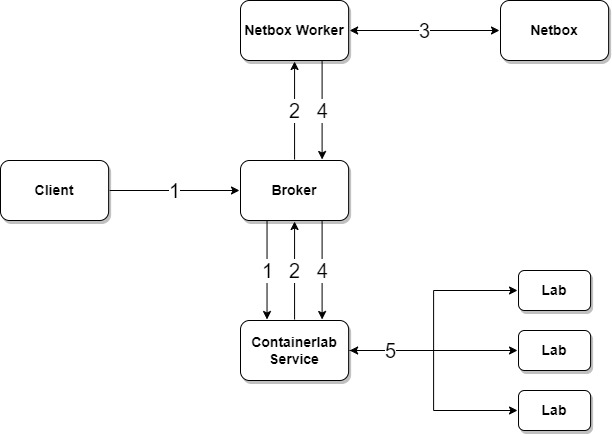
deploy_netbox uses the NetBox service get_containerlab_inventory task to fetch topology inventory data from NetBox.
-
Client submits request to Containerlab service to deploy a lab
-
Containerlab worker sends a job request to NetBox service to retrieve topology data for requested devices
-
NetBox service fetches data from NetBox and constructs Containerlab inventory
-
NetBox returns lab inventory data back to Containerlab worker
-
Containerlab worker deploys the lab using topology data provided by NetBox service
Device Config Context Containerlab Parameters¤
Containerlab node details can be defined under device configuration context norfab.containerlab path, for example:
{
    "norfab": {
        "containerlab": {
            "kind": "ceos",
            "image": "ceos:latest",
            "mgmt-ipv4": "172.100.100.10/24",
            "ports": [
                {10000: 22},
                {10001: 830}
            ],

            ... any other containerlab node parameters ...

            "interfaces_rename": [
                {
                    "find": "Ethernet",
                    "replace": "eth",
                    "use_regex": false
                }
            ]
        }
    }
}
interfaces_rename- is a list of one or more interface renaming instructions, each item must havefindandreplacedefined, optionaluse_regexflag specifies whether to use regex based pattern substitution.kind- uses NetBox deviceplatformfield value by defaultimage- usesimagevalue if provided, otherwise uses{kind}:latest
Inputs¤
| Parameter | Required | Description |
|---|---|---|
lab_name |
No | Lab name to deploy |
devices |
No | NetBox device names to include |
tenant |
No | NetBox tenant name to select devices |
filters |
No | NetBox device filters |
netbox_instance |
No | NetBox instance name to query |
ipv4_subnet |
No | IPv4 management subnet, default 172.100.100.0/24 |
image |
No | Docker image to use for all nodes |
ports |
No | TCP/UDP port range to allocate for nodes |
reconfigure |
No | Destroy and redeploy an existing lab |
dry_run |
No | Fetch and return inventory without deploying |
Output¤
Normal mode returns Containerlab deployment details. With dry_run=True, the task returns generated topology inventory from NetBox without deploying the lab.
Examples¤
Below is an example of how to use the Containerlab deploy Netbox task to deploy a topology.
Examples
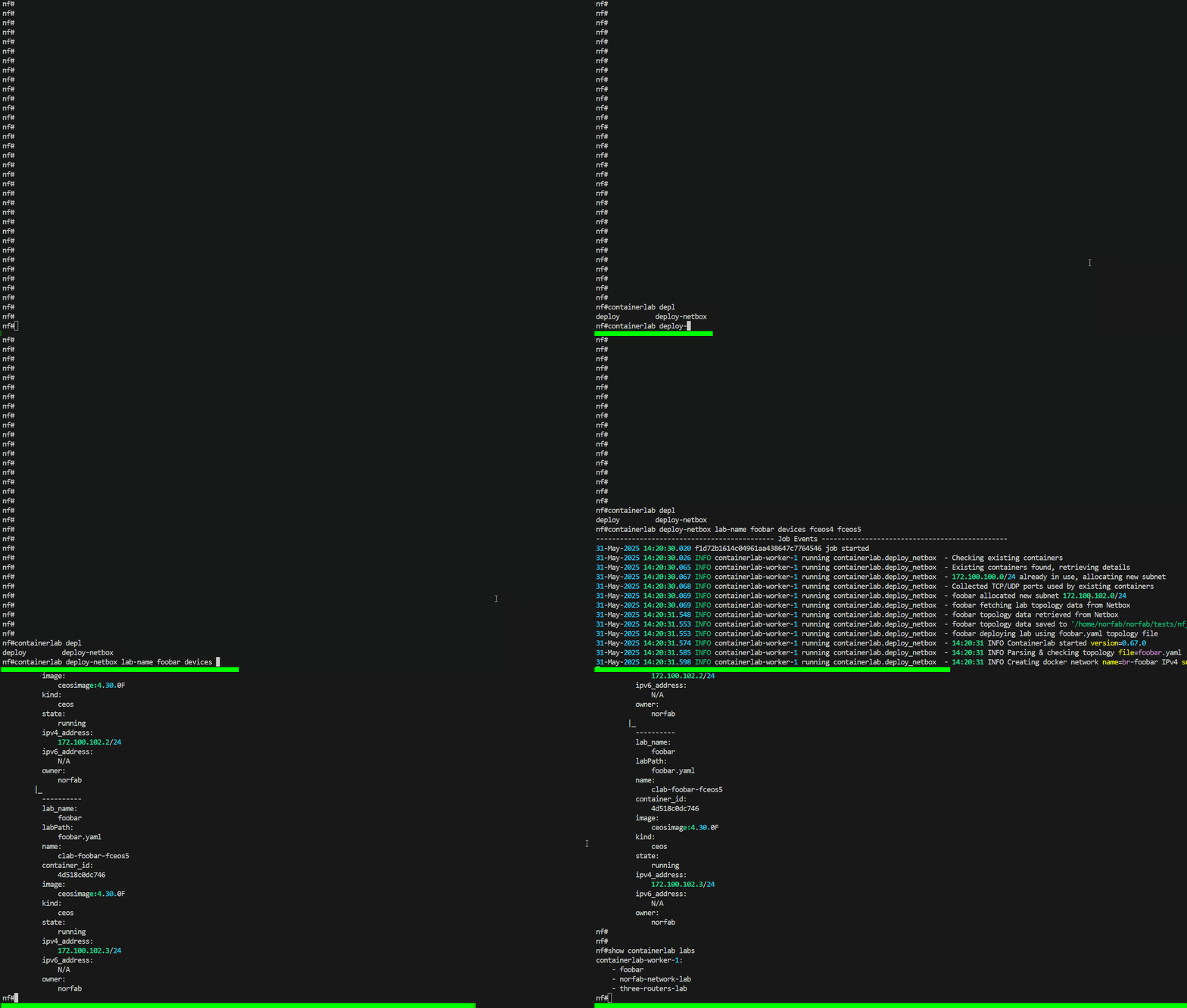
nf#containerlab deploy-netbox lab-name foobar devices fceos4 fceos5
--------------------------------------------- Job Events -----------------------------------------------
31-May-2025 13:02:29.525 9e3b29210e1140f8b3a311e8c4669ca4 job started
31-May-2025 13:02:29.533 INFO containerlab-worker-1 running containerlab.deploy_netbox  - Checking existing containers
31-May-2025 13:02:29.573 INFO containerlab-worker-1 running containerlab.deploy_netbox  - Existing containers found, retrieving details
31-May-2025 13:02:29.574 INFO containerlab-worker-1 running containerlab.deploy_netbox  - 172.100.100.0/24 already in use, allocating new subnet
31-May-2025 13:02:29.575 INFO containerlab-worker-1 running containerlab.deploy_netbox  - Collected TCP/UDP ports used by existing containers
31-May-2025 13:02:29.576 INFO containerlab-worker-1 running containerlab.deploy_netbox  - foobar allocated new subnet 172.100.102.0/24
31-May-2025 13:02:29.576 INFO containerlab-worker-1 running containerlab.deploy_netbox  - foobar fetching lab topology data from Netbox
31-May-2025 13:02:31.090 INFO containerlab-worker-1 running containerlab.deploy_netbox  - foobar topology data retrieved from Netbox
31-May-2025 13:02:31.094 INFO containerlab-worker-1 running containerlab.deploy_netbox  - foobar topology data saved to
'/home/norfab/norfab/tests/nf_containerlab/__norfab__/files/worker/containerlab-worker-1/topologies/foobar/foobar.yaml'
31-May-2025 13:02:31.095 INFO containerlab-worker-1 running containerlab.deploy_netbox  - foobar deploying lab using foobar.yaml topology file
31-May-2025 13:02:31.123 INFO containerlab-worker-1 running containerlab.deploy_netbox  - 13:02:31 INFO Containerlab started version=0.67.0
31-May-2025 13:02:31.134 INFO containerlab-worker-1 running containerlab.deploy_netbox  - 13:02:31 INFO Parsing & checking topology file=foobar.yaml
31-May-2025 13:02:31.145 INFO containerlab-worker-1 running containerlab.deploy_netbox  - 13:02:31 INFO Creating docker network name=br-foobar IPv4 subnet=172.100.102.0/24 IPv6 subnet="" MTU=0
31-May-2025 13:02:31.257 INFO containerlab-worker-1 running containerlab.deploy_netbox  - 13:02:31 INFO Creating lab directory
path=/home/norfab/norfab/tests/nf_containerlab/__norfab__/files/worker/containerlab-worker-1/topologies/foobar/clab-foobar
31-May-2025 13:02:31.268 INFO containerlab-worker-1 running containerlab.deploy_netbox  - 13:02:31 INFO config file
'/home/norfab/norfab/tests/nf_containerlab/__norfab__/files/worker/containerlab-worker-1/topologies/foobar/clab-foobar/fceos4/flash/startup-config' for node 'fceos4' already exists and will not be generated/reset
31-May-2025 13:02:31.280 INFO containerlab-worker-1 running containerlab.deploy_netbox  - 13:02:31 INFO Creating container name=fceos4
31-May-2025 13:02:31.291 INFO containerlab-worker-1 running containerlab.deploy_netbox  - 13:02:31 INFO config file
'/home/norfab/norfab/tests/nf_containerlab/__norfab__/files/worker/containerlab-worker-1/topologies/foobar/clab-foobar/fceos5/flash/startup-config' for node 'fceos5' already exists and will not be generated/reset
31-May-2025 13:02:31.302 INFO containerlab-worker-1 running containerlab.deploy_netbox  - 13:02:31 INFO Creating container name=fceos5
31-May-2025 13:02:32.065 INFO containerlab-worker-1 running containerlab.deploy_netbox  - 13:02:32 INFO Created link: fceos5:eth1 ▪┄┄▪ fceos4:eth1
31-May-2025 13:02:32.220 INFO containerlab-worker-1 running containerlab.deploy_netbox  - 13:02:32 INFO Created link: fceos5:eth2 ▪┄┄▪ fceos4:eth2
31-May-2025 13:02:32.592 INFO containerlab-worker-1 running containerlab.deploy_netbox  - 13:02:32 INFO Created link: fceos5:eth3 ▪┄┄▪ fceos4:eth3
31-May-2025 13:02:32.744 INFO containerlab-worker-1 running containerlab.deploy_netbox  - 13:02:32 INFO Created link: fceos5:eth4 ▪┄┄▪ fceos4:eth4
31-May-2025 13:02:32.844 INFO containerlab-worker-1 running containerlab.deploy_netbox  - 13:02:32 INFO Created link: fceos5:eth6 ▪┄┄▪ fceos4:eth6
31-May-2025 13:02:32.953 INFO containerlab-worker-1 running containerlab.deploy_netbox  - 13:02:32 INFO Created link: fceos5:eth7 ▪┄┄▪ fceos4:eth7
31-May-2025 13:02:32.964 INFO containerlab-worker-1 running containerlab.deploy_netbox  - 13:02:32 INFO Running postdeploy actions for Arista cEOS 'fceos5' node
31-May-2025 13:02:33.005 INFO containerlab-worker-1 running containerlab.deploy_netbox  - 13:02:33 INFO Created link: fceos5:eth8 ▪┄┄▪ fceos4:eth101
31-May-2025 13:02:33.053 INFO containerlab-worker-1 running containerlab.deploy_netbox  - 13:02:33 INFO Created link: fceos5:eth11 ▪┄┄▪ fceos4:eth11
31-May-2025 13:02:33.064 INFO containerlab-worker-1 running containerlab.deploy_netbox  - 13:02:33 INFO Running postdeploy actions for Arista cEOS 'fceos4' node
31-May-2025 13:02:54.730 INFO containerlab-worker-1 running containerlab.deploy_netbox  - 13:02:54 INFO Adding host entries path=/etc/hosts
31-May-2025 13:02:54.742 INFO containerlab-worker-1 running containerlab.deploy_netbox  - 13:02:54 INFO Adding SSH config for nodes path=/etc/ssh/ssh_config.d/clab-foobar.conf
31-May-2025 13:02:54.859 9e3b29210e1140f8b3a311e8c4669ca4 job completed in 25.334 seconds

--------------------------------------------- Job Results --------------------------------------------

containerlab-worker-1:
    ----------
    containers:
        |_
        ----------
        lab_name:
            foobar
        labPath:
            foobar.yaml
        name:
            clab-foobar-fceos4
        container_id:
            c24aa0089eca
        image:
            ceosimage:4.30.0F
        kind:
            ceos
        state:
            running
        ipv4_address:
            172.100.102.2/24
            N/A
        owner:
            norfab
        |_
        lab_name:
            foobar
        labPath:
            foobar.yaml
        name:
            clab-foobar-fceos5
        container_id:
            2098290d7a79
        image:
            ceosimage:4.30.0F
        kind:
            ceos
        state:
            running
        ipv4_address:
            172.100.102.3/24
        ipv6_address:
            N/A
        owner:
            norfab
nf#show containerlab labs
containerlab-worker-1:
    - foobar
nf#
In this example:
nfclicommand starts the NorFab Interactive Shellcontainerlabcommand switches to the Containerlab sub-shelldeploy-netboxcommand instructs Containerlab service to deploy a topologydevicesspecifies the devices to fetch data and links for from NetBox
Context manager - deploy selected devices:
import pprint

from norfab.core.nfapi import NorFab

with NorFab(inventory="./inventory.yaml") as nf:
    client = nf.make_client()

    result = client.run_job(
        service="containerlab",
        task="deploy_netbox",
        workers="any",
        kwargs={
            "devices": ["fceos4", "fceos5"],
            "lab_name": "foobar",
        },
    )

    pprint.pprint(result)
Direct lifecycle - dry run with filters:
import pprint

from norfab.core.nfapi import NorFab

nf = NorFab(inventory="./inventory.yaml")
try:
    nf.start()
    client = nf.make_client()

    result = client.run_job(
        service="containerlab",
        task="deploy_netbox",
        workers="any",
        kwargs={
            "lab_name": "leaf-lab",
            "filters": {
                "role": "leaf",
                "site": "lab",
                "status": "active",
            },
            "netbox_instance": "lab",
            "dry_run": True,
        },
    )

    pprint.pprint(result)
finally:
    nf.destroy()
Direct lifecycle - deploy by tenant and reconfigure:
import pprint

from norfab.core.nfapi import NorFab

nf = NorFab(inventory="./inventory.yaml")
try:
    nf.start()
    client = nf.make_client()

    result = client.run_job(
        service="containerlab",
        task="deploy_netbox",
        workers="any",
        kwargs={
            "lab_name": "tenant-lab",
            "tenant": "engineering",
            "ipv4_subnet": "172.100.120.0/24",
            "image": "ceosimage:4.30.0F",
            "ports": [12000, 13000],
            "reconfigure": True,
        },
    )

    pprint.pprint(result)
finally:
    nf.destroy()
Reconfiguring an Existing Lab¤
The deploy_netbox task supports reconfiguring an already deployed lab by using the reconfigure argument. This allows you to update the lab configuration without destroying and redeploying it.
Filtering Nodes for Deployment¤
The deploy_netbox task allows you to deploy specific nodes in a topology using the node_filter argument. This is useful for testing or updating specific parts of a lab without affecting the entire topology.
NORFAB Containerlab Deploy NetBox Command Shell Reference¤
Below are the commands supported by the deploy_netbox task:
nf# man tree containerlab.deploy-netbox
└── containerlab:    Containerlab service
    └── deploy-netbox:    Spins up a lab using devices data from NetBox
        ├── timeout:    Job timeout
        ├── workers:    Filter worker to target, default 'any'
        ├── verbose-result:    Control output details, default 'False'
        ├── lab-name:    Lab name to generate lab inventory for
        ├── tenant:    Tenant name to generate lab inventory for
        ├── filters:    NetBox device filters to generate lab inventory for
        │   ├── tenant:    Filter devices by tenants
        │   ├── device-name-contains:    Filter devices by name pattern
        │   ├── model:    Filter devices by models
        │   ├── platform:    Filter devices by platforms
        │   ├── region:    Filter devices by regions
        │   ├── role:    Filter devices by roles
        │   ├── site:    Filter devices by sites
        │   ├── status:    Filter devices by statuses
        │   └── tag:    Filter devices by tags
        ├── devices:    List of devices to generate lab inventory for
        ├── progress:    Display progress events, default 'True'
        ├── netbox-instance:    Name of NetBox instance to pull inventory from
        ├── ipv4-subnet:    IPv4 management subnet to use for lab, default '172.100.100.0/24'
        ├── image:    Docker image to use for all nodes
        ├── ports:    Range of TCP/UDP ports to use for nodes, default '[12000, 13000]'
        ├── reconfigure:    Destroy the lab and then re-deploy it., default 'False'
        └── dry-run:    Do not deploy, only fetch inventory from NetBox
nf#
* - mandatory/required command argument
Python API Reference¤
Deploys a containerlab topology using device data from the Netbox database.
This method orchestrates the deployment of a containerlab topology by:
- Inspecting existing containers to determine subnets and ports in use.
- Allocating a management IPv4 subnet for the new lab, avoiding conflicts.
- Downloading inventory data from Netbox for the specified lab and filters.
- Saving the generated topology file to a dedicated folder.
- Executing the
containerlab deploycommand with appropriate arguments.
To retrieve topology data from Netbox at least one of these arguments must be provided to identify a set of devices to include into Containerlab topology:
tenant- deploys lab using all devices and links that belong to this tenantdevices- lab deployed only using devices in the listsfilters- list of device filters to retrieve from Netbox
If multiple of above arguments provided, resulting lab topology is a sum of all devices matched.
Parameters:
| Name | Type | Description | Default |
|---|---|---|---|
lab_name
|
str
|
The name to use for the lab to deploy. |
None
|
tenant
|
str
|
Deploy lab for given tenant, lab name if not set becomes equal to tenant name. |
None
|
filters
|
list
|
List of filters to apply when fetching devices from Netbox. |
None
|
devices
|
list
|
List of specific devices to include in the topology. |
None
|
instance
|
str
|
Netbox instance identifier. |
None
|
branch
|
str
|
NetBox Branching plugin branch name to read devices and connections from. Creates the branch if it does not exist. |
None
|
image
|
str
|
Container image to use for devices. |
None
|
ipv4_subnet
|
str
|
Management IPv4 subnet for the lab. |
'172.100.100.0/24'
|
ports
|
tuple
|
Tuple specifying the range of ports to allocate. |
(12000, 15000)
|
progress
|
bool
|
If True, emits progress events. |
False
|
reconfigure
|
bool
|
If True, reconfigures an already deployed lab. |
False
|
timeout
|
int
|
Timeout in seconds for the deployment process. |
600
|
node_filter
|
str
|
Comma-separated string of nodes to deploy. |
None
|
dry_run
|
bool
|
If True, only generates and returns the topology inventory without deploying. |
False
|
Returns:
| Name | Type | Description |
|---|---|---|
Result |
Result
|
deployment results with a list of nodes deployed |
Raises:
| Type | Description |
|---|---|
Exception
|
If the topology file cannot be fetched. |
Source code in norfab\workers\containerlab_worker\containerlab_worker.py
905 906 907 908 909 910 911 912 913 914 915 916 917 918 919 920 921 922 923 924 925 926 927 928 929 930 931 932 933 934 935 936 937 938 939 940 941 942 943 944 945 946 947 948 949 950 951 952 953 954 955 956 957 958 959 960 961 962 963 964 965 966 967 968 969 970 971 972 973 974 975 976 977 978 979 980 981 982 983 984 985 986 987 988 989 990 991 992 993 994 995 996 997 998 999 1000 1001 1002 1003 1004 1005 1006 1007 1008 1009 1010 1011 1012 1013 1014 1015 1016 1017 1018 1019 1020 1021 1022 1023 1024 1025 1026 1027 1028 1029 1030 1031 1032 1033 1034 1035 1036 1037 1038 1039 1040 1041 1042 1043 1044 1045 1046 1047 1048 1049 1050 1051 1052 1053 1054 1055 1056 1057 1058 1059 1060 1061 1062 1063 1064 1065 1066 1067 1068 1069 1070 1071 1072 1073 1074 1075 1076 1077 1078 1079 1080 1081 1082 1083 1084 1085 1086 1087 1088 1089 1090 1091 1092 1093 1094 1095 1096 1097 1098 1099 1100 1101 1102 1103 1104 1105 1106 1107 1108 1109 1110 1111 1112 1113 1114 1115 1116 1117 1118 | |