Nornir Service CLI Task¤
task api name:
cli
Nornir service cli task designed to retrieve show commands output
from devices using SSH and Telnet. Nornir cli uses Netmiko, Scrapli
and NAPALM libraries to communicate with devices.
- Netmiko: A multi-vendor library that simplifies SSH connections to network devices.
- Scrapli: A fast and flexible library for interacting with network devices.
- NAPALM: A library that provides a unified API to interact with different network device operating systems.
Inputs¤
| Parameter | Required | Description |
|---|---|---|
commands |
Yes | Commands to run on target devices. |
plugin |
No | CLI collection plugin parameters for Netmiko, Scrapli, or NAPALM. |
enable |
No | Enter enable mode before running commands. |
workers |
No | Nornir workers to target. Defaults to all workers. |
add_details |
No | Include detailed Nornir task metadata in the result. |
tf, diff, diff_last |
No | Save task results to worker files or compare with previous saved results. |
FC, FB, FH, FL, FM, FG, FR, FO, FP, FX, FN, hosts |
No | Host filters. |
Output¤
The task returns per-host command output keyed by command. With add_details=True, the result can include Nornir task metadata such as failure state, exception text, retry counters, and plugin-specific details.
MCP Guardrails¤
When exposed through FastMCP, the cli task includes default guardrails that
reject high-risk command values before a NorFab job is dispatched. The defaults
block commands that reboot, reload, or restart devices; enter configuration
mode; enter device shell modes such as bash, shell, or guestshell; or
change OS images or packages; open outbound sessions such as ssh or
telnet; or commit, delete, clear, debug, reset, or otherwise change device
state.
These guardrails apply only to MCP tool calls. They do not change direct NorFab
client, NFCLI, FastAPI, or worker behavior. FastMCP operators can add inventory
guardrails or disable built-in guardrails with tools.disable_builtin_guardrails.
The MCP result also has built-in replacement guardrails for documented Cisco
IOS, Cisco IOS XR, Arista EOS, Juniper Junos, FortiOS, Huawei VRP, and Linux
credential formats. Passwords, SNMP communities, shared secrets,
authentication keys, HTTP authorization and cookie headers, URL credentials,
OAuth token parameters, netrc passwords, Linux shadow hashes, and PEM
private-key bodies are replaced with REDACTED.
The raw result stored in the FastMCP job database is unchanged.
Warning
Guardrails inspect inline commands values only. If commands points to a
Filesharing path such as nf://cli/commands.txt, FastMCP checks the path
string, not the downloaded or rendered file content.
Result redaction is pattern-based and applies only to results delivered through FastMCP. Direct NorFab clients and raw database retrieval remain unsanitized.
Use NFCLI to inspect the currently published guardrails:
show fastmcp tools service nornir name *cli*
Examples¤
Below is an example of how to use the Nornir CLI task to retrieve command outputs from devices.
Example
C:\nf>nfcli
Welcome to NorFab Interactive Shell.
nf#
nf#nornir
nf[nornir]#cli
nf[nornir-cli]#
nf[nornir-cli]#commands "show clock" "show hostname" FC ceos-spine
ceos-spine-1:
    show clock:
        Sun Dec  1 10:49:58 2024
        Timezone: UTC
        Clock source: local
    show hostname:
        Hostname: ceos-spine-1
        FQDN:     ceos-spine-1
ceos-spine-2:
    show clock:
        Sun Dec  1 10:49:58 2024
        Timezone: UTC
        Clock source: local
    show hostname:
        Hostname: ceos-spine-2
        FQDN:     ceos-spine-2
nf[nornir-cli]#
Demo
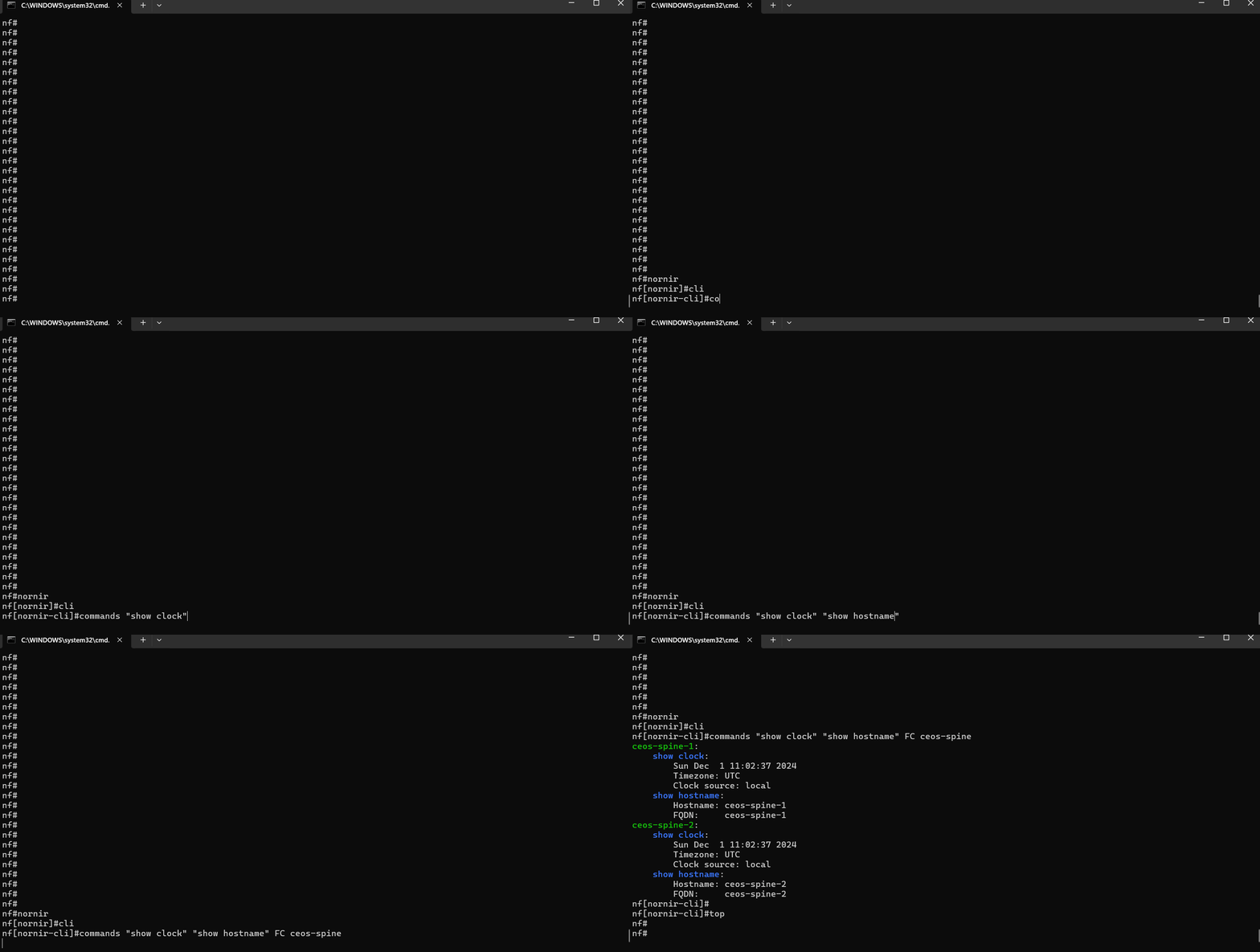
In this example:
nfclicommand starts the NorFab Interactive Shell.nornircommand switches to the Nornir sub-shell.clicommand switches to the CLI task sub-shell.commandscommand retrieves the output of "show clock" and "show hostname" from the devices that containceos-spinein their hostname as we useFC- "Filter Contains" Nornir hosts targeting filter.
inventory.yaml should be located in same folder where we start nfcli, unless nfcli -i path_to_inventory.yaml flag used. Refer to Getting Started section on how to construct inventory.yaml file
Context manager - collect show command output:
import pprint

from norfab.core.nfapi import NorFab

with NorFab(inventory="inventory.yaml") as nf:
    client = nf.make_client()

    result = client.run_job(
        service="nornir",
        task="cli",
        kwargs={
            "commands": ["show clock", "show hostname"],
            "FC": "ceos-spine",
        },
    )

    pprint.pprint(result)
Direct lifecycle - same task:
import pprint

from norfab.core.nfapi import NorFab

if __name__ == '__main__':
    nf = NorFab(inventory="inventory.yaml")
    nf.start()

    client = nf.make_client()

    res = client.run_job(
        service="nornir",
        task="cli",
        kwargs={
            "commands": ["show clock", "show hostname"],
            "FC": "ceos-spine"
        }
    )

    pprint.pprint(res)

    nf.destroy()
Once executed, above code should produce this output:
C:\nf>python nornir_cli.py
{'nornir-worker-1': {'errors': [],
                     'failed': False,
                     'messages': [],
                     'result': {'ceos-spine-1': {'show clock': 'Sun Dec  1 '
                                                               '11:10:53 2024\n'
                                                               'Timezone: UTC\n'
                                                               'Clock source: '
                                                               'local',
                                                 'show hostname': 'Hostname: '
                                                                  'ceos-spine-1\n'
                                                                  'FQDN:     '
                                                                  'ceos-spine-1'},
                                'ceos-spine-2': {'show clock': 'Sun Dec  1 '
                                                               '11:10:53 2024\n'
                                                               'Timezone: UTC\n'
                                                               'Clock source: '
                                                               'local',
                                                 'show hostname': 'Hostname: '
                                                                  'ceos-spine-2\n'
                                                                  'FQDN:     '
                                                                  'ceos-spine-2'}},
                     'task': 'nornir-worker-1:cli'}}
C:\nf>
Refer to Getting Started section on
how to construct inventory.yaml file.
Use Different Connection Plugins¤
The Nornir Service CLI Task supports various connection plugins, such as netmiko, napalm, and scrapli, to interact with network devices. These plugins provide the flexibility to choose the most suitable method for connecting to and managing your devices, depending on your specific requirements and preferences.
To use a specific connection plugin, ensure that your Nornir inventory is properly configured with the necessary connection parameters and device-specific settings. This includes specifying the plugin type, authentication details, and any additional options required by the plugin.
Example
C:\nf>nfcli
Welcome to NorFab Interactive Shell.
nf#
nf#nornir cli
nf[nornir-cli]#commands "show clock" FC spine plugin netmiko
--------------------------------------------- Job Events -----------------------------------------------
04-Jan-2025 22:37:57 5ed5775b183a404181f004753f583f0c job started
04-Jan-2025 22:37:57.085 nornir nornir-worker-1 ceos-spine-1, ceos-spine-2 task started - 'netmiko_send_commands'
04-Jan-2025 22:37:57.114 nornir nornir-worker-1 ceos-spine-1 task_instance started - 'netmiko_send_commands'
04-Jan-2025 22:37:57.114 nornir nornir-worker-1 ceos-spine-2 task_instance started - 'netmiko_send_commands'
04-Jan-2025 22:37:57.124 nornir nornir-worker-1 ceos-spine-1 subtask started - 'show clock'
04-Jan-2025 22:37:57.136 nornir nornir-worker-1 ceos-spine-2 subtask started - 'show clock'
04-Jan-2025 22:37:57.237 nornir nornir-worker-1 ceos-spine-1 subtask completed - 'show clock'
04-Jan-2025 22:37:57.237 nornir nornir-worker-1 ceos-spine-2 subtask completed - 'show clock'
04-Jan-2025 22:37:57.244 nornir nornir-worker-1 ceos-spine-2 task_instance completed - 'netmiko_send_commands'
04-Jan-2025 22:37:57.245 nornir nornir-worker-1 ceos-spine-1 task_instance completed - 'netmiko_send_commands'
04-Jan-2025 22:37:57.425 nornir nornir-worker-1 ceos-spine-1, ceos-spine-2 task completed - 'netmiko_send_commands'
04-Jan-2025 22:37:57 5ed5775b183a404181f004753f583f0c job completed in 0.476 seconds

--------------------------------------------- Job Results --------------------------------------------

ceos-spine-1:
    show clock:
        Sat Jan  4 12:37:57 2025
        Timezone: UTC
        Clock source: local
ceos-spine-2:
    show clock:
        Sat Jan  4 12:37:57 2025
        Timezone: UTC
        Clock source: local
nf[nornir-cli]#commands "show clock" FC spine plugin scrapli
--------------------------------------------- Job Events -----------------------------------------------
04-Jan-2025 22:38:01 c6bd014aac4c42249594a6197175012e job started
04-Jan-2025 22:38:01.116 nornir nornir-worker-1 ceos-spine-1, ceos-spine-2 task started - 'scrapli_send_commands'
04-Jan-2025 22:38:01.119 nornir nornir-worker-1 ceos-spine-2 task_instance started - 'scrapli_send_commands'
04-Jan-2025 22:38:01.128 nornir nornir-worker-1 ceos-spine-2 subtask started - 'show clock'
04-Jan-2025 22:38:01.141 nornir nornir-worker-1 ceos-spine-2 subtask completed - 'show clock'
04-Jan-2025 22:38:01.148 nornir nornir-worker-1 ceos-spine-2 task_instance completed - 'scrapli_send_commands'
04-Jan-2025 22:38:01.192 nornir nornir-worker-1 ceos-spine-1 task_instance started - 'scrapli_send_commands'
04-Jan-2025 22:38:01.202 nornir nornir-worker-1 ceos-spine-1 subtask started - 'show clock'
04-Jan-2025 22:38:01.215 nornir nornir-worker-1 ceos-spine-1 subtask completed - 'show clock'
04-Jan-2025 22:38:01.221 nornir nornir-worker-1 ceos-spine-1 task_instance completed - 'scrapli_send_commands'
04-Jan-2025 22:38:01.364 nornir nornir-worker-1 ceos-spine-1, ceos-spine-2 task completed - 'scrapli_send_commands'
04-Jan-2025 22:38:01 c6bd014aac4c42249594a6197175012e job completed in 0.497 seconds

--------------------------------------------- Job Results --------------------------------------------

ceos-spine-1:
    show clock:
        Sat Jan  4 12:38:01 2025
        Sat Jan  4 12:38:01 2025
        Timezone: UTC
        Clock source: local
ceos-spine-2:
    show clock:
        Sat Jan  4 12:38:01 2025
        Timezone: UTC
        Clock source: local
nf[nornir-cli]#commands "show clock" FC spine plugin napalm
--------------------------------------------- Job Events -----------------------------------------------
04-Jan-2025 22:43:41 02eed090a7bb4652b27cccec1a49dab6 job started
04-Jan-2025 22:43:41.360 nornir nornir-worker-1 ceos-spine-1, ceos-spine-2 task started - 'napalm_send_commands'
04-Jan-2025 22:43:41.382 nornir nornir-worker-1 ceos-spine-2 task_instance started - 'napalm_send_commands'
04-Jan-2025 22:43:41.382 nornir nornir-worker-1 ceos-spine-1 task_instance started - 'napalm_send_commands'
04-Jan-2025 22:43:41.388 nornir nornir-worker-1 ceos-spine-1 subtask started - 'napalm_cli'
04-Jan-2025 22:43:41.389 nornir nornir-worker-1 ceos-spine-2 subtask started - 'napalm_cli'
04-Jan-2025 22:43:41.419 nornir nornir-worker-1 ceos-spine-1 subtask completed - 'napalm_cli'
04-Jan-2025 22:43:41.424 nornir nornir-worker-1 ceos-spine-2 subtask completed - 'napalm_cli'
04-Jan-2025 22:43:41.425 nornir nornir-worker-1 ceos-spine-1 task_instance completed - 'napalm_send_commands'
04-Jan-2025 22:43:41.432 nornir nornir-worker-1 ceos-spine-2 task_instance completed - 'napalm_send_commands'
04-Jan-2025 22:43:41.599 nornir nornir-worker-1 ceos-spine-1, ceos-spine-2 task completed - 'napalm_send_commands'
04-Jan-2025 22:43:41 02eed090a7bb4652b27cccec1a49dab6 job completed in 0.576 seconds

--------------------------------------------- Job Results --------------------------------------------

ceos-spine-1:
    show clock:
        Sat Jan  4 12:43:41 2025
        Timezone: UTC
        Clock source: local
ceos-spine-2:
    show clock:
        Sat Jan  4 12:43:41 2025
        Timezone: UTC
        Clock source: local
nf[nornir-cli]#
nf#
Demo
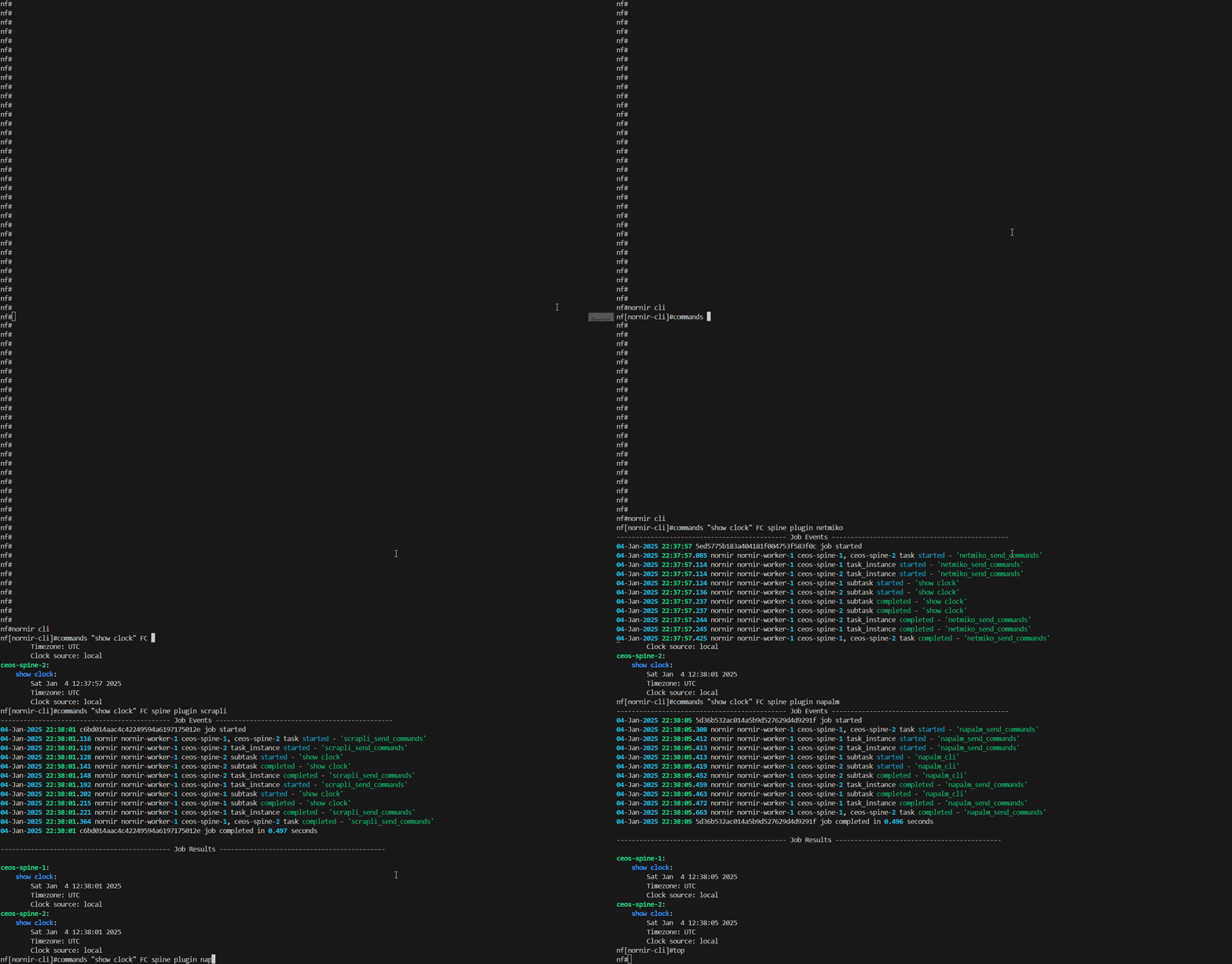
In this example:
nfclicommand starts the NorFab Interactive Shell.nornircommand switches to the Nornir sub-shell.clicommand switches to the CLI task sub-shell.commandscommand retrieves the output of "show clock" from the devices that containspinein their hostname as we useFC- "Filter Contains" Nornir hosts targeting filter,pluginargument used to inform Nornir service to usenetmiko,scrapliornapalmmodules to retrieve command output from devices.
inventory.yaml should be located in same folder where we start nfcli, unless nfcli -i path_to_inventory.yaml flag used. Refer to Getting Started section on how to construct inventory.yaml file
Context manager - select Netmiko and enter enable mode:
import pprint

from norfab.core.nfapi import NorFab

with NorFab(inventory="inventory.yaml") as nf:
    client = nf.make_client()

    result = client.run_job(
        service="nornir",
        task="cli",
        kwargs={
            "commands": ["show clock"],
            "FC": "ceos-spine",
            "plugin": "netmiko",
            "enable": True,
        },
    )

    pprint.pprint(result)
Direct lifecycle - select a connection plugin:
import pprint

from norfab.core.nfapi import NorFab

if __name__ == '__main__':
    nf = NorFab(inventory="inventory.yaml")
    nf.start()

    client = nf.make_client()

    res = client.run_job(
        service="nornir",
        task="cli",
        kwargs={
            "commands": ["show clock"],
            "FC": "ceos-spine",
            "plugin": "scrapli"
        }
    )

    pprint.pprint(res)

    nf.destroy()
Once executed, above code should produce this output:
C:\nf>python nornir_cli.py
{'nornir-worker-1': {'errors': [],
                     'failed': False,
                     'messages': [],
                     'result': {'ceos-spine-1': {'show clock': 'Sun Dec  1 '
                                                               '11:10:53 2024\n'
                                                               'Timezone: UTC\n'
                                                               'Clock source: '
                                                               'local'},
                                'ceos-spine-2': {'show clock': 'Sun Dec  1 '
                                                               '11:10:53 2024\n'
                                                               'Timezone: UTC\n'
                                                               'Clock source: '
                                                               'local'}},
                     'task': 'nornir-worker-1:cli'}}
C:\nf>
Refer to Getting Started section on
how to construct inventory.yaml file.
Outputting Text Tables¤
NorFab interactive shell supports table argument that can be used to format output into text tables. Internally it relies on tabulate module and most of its features are supported.
Example
nf# nornir cli commands "show version" FC spine add-details table brief
Select and sort table columns:
nf# nornir cli commands "show version" FC spine add-details table extend headers host name result sortby host
Context manager - return list output for custom table formatting:
import pprint

from norfab.core.nfapi import NorFab

with NorFab(inventory="inventory.yaml") as nf:
    client = nf.make_client()

    result = client.run_job(
        service="nornir",
        task="cli",
        kwargs={
            "commands": ["show version"],
            "FC": "spine",
            "add_details": True,
            "to_dict": False,
        },
    )

    pprint.pprint(result)
Direct lifecycle - collect detailed output for external formatting:
import pprint

from norfab.core.nfapi import NorFab

nf = NorFab(inventory="inventory.yaml")
try:
    nf.start()
    client = nf.make_client()

    result = client.run_job(
        service="nornir",
        task="cli",
        kwargs={
            "commands": ["show version"],
            "FC": "spine",
            "add_details": True,
        },
    )

    pprint.pprint(result)
finally:
    nf.destroy()
Sourcing Commands From File¤
Commands can be provided inline in the shell itself, but it is also possible to source commands from text files stored in the Filesharing service.
Example
Run commands stored in a Filesharing service file:
nf# nornir cli commands nf://nornir_commands/show_baseline.txt FC spine
Preview commands from the file without sending them to devices:
nf# nornir cli commands nf://nornir_commands/show_baseline.txt FC spine dry-run
Context manager - run commands from a Filesharing service file:
import pprint

from norfab.core.nfapi import NorFab

with NorFab(inventory="inventory.yaml") as nf:
    client = nf.make_client()

    result = client.run_job(
        service="nornir",
        task="cli",
        kwargs={
            "commands": "nf://nornir_commands/show_baseline.txt",
            "FC": "spine",
        },
    )

    pprint.pprint(result)
Direct lifecycle - dry run commands from a Filesharing service file:
import pprint

from norfab.core.nfapi import NorFab

nf = NorFab(inventory="inventory.yaml")
try:
    nf.start()
    client = nf.make_client()

    result = client.run_job(
        service="nornir",
        task="cli",
        kwargs={
            "commands": "nf://nornir_commands/show_baseline.txt",
            "FC": "spine",
            "dry_run": True,
        },
    )

    pprint.pprint(result)
finally:
    nf.destroy()
Using Jinja2 Templates¤
Commands can be templated using Jinja2. This allows you to create dynamic commands based on variables defined in your inventory or passed as job data.
Example
Render commands with host inventory data:
nf# nornir cli commands "show interface {{ host.data.uplink_interface }}" FC spine dry-run
Render commands from a Filesharing service file:
nf# nornir cli commands nf://nornir_commands/interface_checks.j2 FC spine job-data '{"interface": "Ethernet1"}' dry-run
Context manager - render inline Jinja2 commands:
import pprint

from norfab.core.nfapi import NorFab

with NorFab(inventory="inventory.yaml") as nf:
    client = nf.make_client()

    result = client.run_job(
        service="nornir",
        task="cli",
        kwargs={
            "commands": ["show interface {{ job_data.interface }}"],
            "job_data": {"interface": "Ethernet1"},
            "FC": "spine",
            "dry_run": True,
        },
    )

    pprint.pprint(result)
Direct lifecycle - render a command template from a Filesharing service file:
import pprint

from norfab.core.nfapi import NorFab

nf = NorFab(inventory="inventory.yaml")
try:
    nf.start()
    client = nf.make_client()

    result = client.run_job(
        service="nornir",
        task="cli",
        kwargs={
            "commands": "nf://nornir_commands/interface_checks.j2",
            "job_data": {"interface": "Ethernet1"},
            "FC": "spine",
            "dry_run": True,
        },
    )

    pprint.pprint(result)
finally:
    nf.destroy()
Templating Commands with Inline Job Data¤
Templating commands with inline job data allows you to dynamically generate command strings based on variables defined directly within the job data. This approach provides flexibility and customization, enabling you to tailor commands to specific devices or scenarios without the need for external sourced of data.
When defining a job, you can include variables directly within the job_data argument. These variables can then be referenced within the command strings using Jinja2 templating syntax. The Nornir worker will process these templates, substituting the variables with their corresponding values from the job data.
Example
nf# nornir cli commands "show bgp ipv4 unicast neighbors {{ job_data.peer }} received-routes" FC spine job-data '{"peer": "192.0.2.2"}' dry-run
Context manager - pass inline job data:
import pprint

from norfab.core.nfapi import NorFab

with NorFab(inventory="inventory.yaml") as nf:
    client = nf.make_client()

    result = client.run_job(
        service="nornir",
        task="cli",
        kwargs={
            "commands": [
                "show bgp ipv4 unicast neighbors {{ job_data.peer }} received-routes"
            ],
            "job_data": {"peer": "192.0.2.2"},
            "FC": "spine",
            "dry_run": True,
        },
    )

    pprint.pprint(result)
Direct lifecycle - load job data from a Filesharing service file:
import pprint

from norfab.core.nfapi import NorFab

nf = NorFab(inventory="inventory.yaml")
try:
    nf.start()
    client = nf.make_client()

    result = client.run_job(
        service="nornir",
        task="cli",
        kwargs={
            "commands": "nf://nornir_commands/bgp_peer_checks.j2",
            "job_data": "nf://job_data/bgp_peer.yaml",
            "FC": "spine",
            "dry_run": True,
        },
    )

    pprint.pprint(result)
finally:
    nf.destroy()
Using Dry Run¤
The dry run feature allows you to see the commands that would be executed without actually sending them to the devices. This is useful for testing and validation. When set to True, the commands will not be sent to the devices, but will be returned as part of the result.
Example
nf# nornir cli commands "show interface {{ job_data.interface }}" FC spine job-data '{"interface": "Ethernet1"}' dry-run
Context manager - preview rendered commands:
import pprint

from norfab.core.nfapi import NorFab

with NorFab(inventory="inventory.yaml") as nf:
    client = nf.make_client()

    result = client.run_job(
        service="nornir",
        task="cli",
        kwargs={
            "commands": ["show interface {{ job_data.interface }}"],
            "job_data": {"interface": "Ethernet1"},
            "FC": "spine",
            "dry_run": True,
        },
    )

    pprint.pprint(result)
Direct lifecycle - preview command file expansion:
import pprint

from norfab.core.nfapi import NorFab

nf = NorFab(inventory="inventory.yaml")
try:
    nf.start()
    client = nf.make_client()

    result = client.run_job(
        service="nornir",
        task="cli",
        kwargs={
            "commands": "nf://nornir_commands/show_baseline.txt",
            "FC": "spine",
            "dry_run": True,
        },
    )

    pprint.pprint(result)
finally:
    nf.destroy()
Formatting Output Results¤
You can format the output results using various options provided by the Nornir worker. The output of the commands can be formatted using the to_dict parameter. When set to True, the results will be returned as a dictionary. When set to False, the results will be returned as a list. In addition add_details argument can be used to control the verbosity of the output and return additional Nornir result information such as:
changedflagdiffcontent if supported by pluginfailedstatusexceptiondetails if task execution failed with errorconnection_retrycounter to show how many times RetryRunner tried to establish a connectiontask_retrycounter to show how many times RetryRunner tried to run this task
Example
Include detailed result metadata:
nf# nornir cli commands "show version" FC spine add-details
Return a table with selected columns:
nf# nornir cli commands "show version" FC spine add-details table extend headers host name result
Context manager - include detailed metadata:
import pprint

from norfab.core.nfapi import NorFab

with NorFab(inventory="inventory.yaml") as nf:
    client = nf.make_client()

    result = client.run_job(
        service="nornir",
        task="cli",
        kwargs={
            "commands": ["show version"],
            "FC": "spine",
            "add_details": True,
        },
    )

    pprint.pprint(result)
Direct lifecycle - return list-shaped results:
import pprint

from norfab.core.nfapi import NorFab

nf = NorFab(inventory="inventory.yaml")
try:
    nf.start()
    client = nf.make_client()

    result = client.run_job(
        service="nornir",
        task="cli",
        kwargs={
            "commands": ["show version"],
            "FC": "spine",
            "add_details": True,
            "to_dict": False,
        },
    )

    pprint.pprint(result)
finally:
    nf.destroy()
Running Show Commands Multiple Times¤
You can run show commands multiple times using the repeat parameter. This is useful for monitoring changes over time. The repeat parameter can be used to run the same command multiple times. You can also specify the interval between each repeat using the repeat_interval parameter.
Example
Run a command three times and return only the latest result:
nf# nornir cli commands "show interfaces counters errors" FC spine plugin netmiko repeat 3 repeat-interval 5 return-last 1
Context manager - repeat a command with Netmiko:
import pprint

from norfab.core.nfapi import NorFab

with NorFab(inventory="inventory.yaml") as nf:
    client = nf.make_client()

    result = client.run_job(
        service="nornir",
        task="cli",
        kwargs={
            "commands": ["show interfaces counters errors"],
            "FC": "spine",
            "plugin": "netmiko",
            "repeat": 3,
            "repeat_interval": 5,
            "return_last": 1,
        },
    )

    pprint.pprint(result)
Direct lifecycle - repeat with Scrapli:
import pprint

from norfab.core.nfapi import NorFab

nf = NorFab(inventory="inventory.yaml")
try:
    nf.start()
    client = nf.make_client()

    result = client.run_job(
        service="nornir",
        task="cli",
        kwargs={
            "commands": ["show interfaces counters errors"],
            "FC": "spine",
            "plugin": "scrapli",
            "repeat": 3,
            "repeat_interval": 5,
            "return_last": 1,
        },
    )

    pprint.pprint(result)
finally:
    nf.destroy()
Using Netmiko Promptless Mode¤
NorFab support proprietary promptless mode that can be used with Netmiko, it can be useful when dealing with devices that do not have a consistent prompt, or default Netmiko output collection functions are not reliable enough. This mode can be enabled by setting the use_ps parameter to True.
Example
nf# nornir cli commands "show tech-support" FC spine plugin netmiko use-ps use-ps-timeout 120
Context manager - use promptless mode:
import pprint

from norfab.core.nfapi import NorFab

with NorFab(inventory="inventory.yaml") as nf:
    client = nf.make_client()

    result = client.run_job(
        service="nornir",
        task="cli",
        kwargs={
            "commands": ["show tech-support"],
            "FC": "spine",
            "plugin": "netmiko",
            "use_ps": True,
            "timeout": 120,
        },
    )

    pprint.pprint(result)
Direct lifecycle - combine promptless mode with a stop pattern:
import pprint

from norfab.core.nfapi import NorFab

nf = NorFab(inventory="inventory.yaml")
try:
    nf.start()
    client = nf.make_client()

    result = client.run_job(
        service="nornir",
        task="cli",
        kwargs={
            "commands": ["show tech-support"],
            "FC": "spine",
            "plugin": "netmiko",
            "use_ps": True,
            "timeout": 120,
            "stop_pattern": "*END*",
        },
    )

    pprint.pprint(result)
finally:
    nf.destroy()
Parsing Commands Output¤
When using Netmiko plugin the output of commands can be parsed using various parsers such as textfsm, ttp and genie. This allows you to convert the raw output into structured data.
TTP parsing templates are supported by Netmiko, Scrapli, and NAPALM connection plugins. To invoke TTP, use run_ttp with a path to a parsing template stored in the Filesharing service.
Example
Parse command output with TextFSM through Netmiko:
nf# nornir cli commands "show ip interface brief" FC spine plugin netmiko use-textfsm
Parse output with a TTP template stored in the Filesharing service:
nf# nornir cli commands "show lldp neighbors" FC spine run-ttp nf://ttp_templates/lldp_neighbors.ttp
Context manager - use TextFSM:
import pprint

from norfab.core.nfapi import NorFab

with NorFab(inventory="inventory.yaml") as nf:
    client = nf.make_client()

    result = client.run_job(
        service="nornir",
        task="cli",
        kwargs={
            "commands": ["show ip interface brief"],
            "FC": "spine",
            "plugin": "netmiko",
            "use_textfsm": True,
        },
    )

    pprint.pprint(result)
Direct lifecycle - run a TTP parser:
import pprint

from norfab.core.nfapi import NorFab

nf = NorFab(inventory="inventory.yaml")
try:
    nf.start()
    client = nf.make_client()

    result = client.run_job(
        service="nornir",
        task="cli",
        kwargs={
            "commands": ["show lldp neighbors"],
            "FC": "spine",
            "run_ttp": "nf://ttp_templates/lldp_neighbors.ttp",
        },
    )

    pprint.pprint(result)
finally:
    nf.destroy()
Filtering Commands Output¤
The output of commands can be filtered to only include specific information. This can be done using match command with containment patterns.
Example
Use the shell pipe to keep lines containing up:
nf# nornir cli commands "show ip interface brief" FC spine | match up
Stop repeated collection when output contains a pattern:
nf# nornir cli commands "show bgp summary" FC spine plugin netmiko repeat 10 repeat-interval 5 stop-pattern "*Established*"
Context manager - stop repeated collection on a pattern:
import pprint

from norfab.core.nfapi import NorFab

with NorFab(inventory="inventory.yaml") as nf:
    client = nf.make_client()

    result = client.run_job(
        service="nornir",
        task="cli",
        kwargs={
            "commands": ["show bgp summary"],
            "FC": "spine",
            "plugin": "netmiko",
            "repeat": 10,
            "repeat_interval": 5,
            "stop_pattern": "*Established*",
            "return_last": 1,
        },
    )

    pprint.pprint(result)
Direct lifecycle - retrieve output and filter in Python:
import pprint

from norfab.core.nfapi import NorFab

nf = NorFab(inventory="inventory.yaml")
try:
    nf.start()
    client = nf.make_client()

    result = client.run_job(
        service="nornir",
        task="cli",
        kwargs={
            "commands": ["show ip interface brief"],
            "FC": "spine",
        },
    )

    filtered = {
        worker: {
            host: {
                command: "\n".join(
                    line for line in output.splitlines() if "up" in line
                )
                for command, output in hosts.items()
            }
            for host, hosts in payload["result"].items()
        }
        for worker, payload in result.items()
    }
    pprint.pprint(filtered)
finally:
    nf.destroy()
Sending New Line Character¤
You can send a new line character as part of the command to devices. This is useful for commands that require a new line to be executed properly. To send new-line character need to include _br_ into command text.
Example
nf# nornir cli commands "show running-config section router bgp_br_" FC spine plugin netmiko split-lines
Context manager - split multiline commands with the default _br_ marker:
import pprint

from norfab.core.nfapi import NorFab

with NorFab(inventory="inventory.yaml") as nf:
    client = nf.make_client()

    result = client.run_job(
        service="nornir",
        task="cli",
        kwargs={
            "commands": ["show running-config section router bgp_br_"],
            "FC": "spine",
            "plugin": "netmiko",
            "split_lines": True,
        },
    )

    pprint.pprint(result)
Direct lifecycle - use a custom newline marker:
import pprint

from norfab.core.nfapi import NorFab

nf = NorFab(inventory="inventory.yaml")
try:
    nf.start()
    client = nf.make_client()

    result = client.run_job(
        service="nornir",
        task="cli",
        kwargs={
            "commands": ["terminal length 0__NL__show version"],
            "FC": "spine",
            "plugin": "netmiko",
            "split_lines": True,
            "new_line_char": "__NL__",
        },
    )

    pprint.pprint(result)
finally:
    nf.destroy()
Saving Task Results to Files¤
The results of tasks can be saved to files for later analysis and record-keeping. This is particularly useful for maintaining logs of command outputs, configuration changes, and other important data. By saving task results to files, you can create a historical record of network operations, which can be invaluable for troubleshooting, auditing, and compliance purposes.
Example
nf# nornir cli commands "show version" "show ip interface brief" FC spine tf pre-change
Skip saving failed host results:
nf# nornir cli commands "show version" FC spine tf pre-change tf-skip-failed
Context manager - save task results to a file group:
import pprint

from norfab.core.nfapi import NorFab

with NorFab(inventory="inventory.yaml") as nf:
    client = nf.make_client()

    result = client.run_job(
        service="nornir",
        task="cli",
        kwargs={
            "commands": ["show version", "show ip interface brief"],
            "FC": "spine",
            "tf": "pre-change",
        },
    )

    pprint.pprint(result)
Direct lifecycle - skip failed hosts when saving:
import pprint

from norfab.core.nfapi import NorFab

nf = NorFab(inventory="inventory.yaml")
try:
    nf.start()
    client = nf.make_client()

    result = client.run_job(
        service="nornir",
        task="cli",
        kwargs={
            "commands": ["show version"],
            "FC": "spine",
            "tf": "pre-change",
            "tf_skip_failed": True,
        },
    )

    pprint.pprint(result)
finally:
    nf.destroy()
Using Diff Function to Compare Results¤
The diff function allows you to compare the results of different task results for same commands. This is useful for identifying changes in configurations or device state, detecting anomalies, and verifying the impact of network modifications. By using the diff function, you can ensure that your network remains consistent and identify any unintended changes that may have occurred.
Example
Save a baseline:
nf# nornir cli commands "show version" "show ip interface brief" FC spine tf pre-change
Compare current output with the latest saved baseline:
nf# nornir cli commands "show version" "show ip interface brief" FC spine diff pre-change diff-last 1
Context manager - save a baseline:
import pprint

from norfab.core.nfapi import NorFab

with NorFab(inventory="inventory.yaml") as nf:
    client = nf.make_client()

    result = client.run_job(
        service="nornir",
        task="cli",
        kwargs={
            "commands": ["show version", "show ip interface brief"],
            "FC": "spine",
            "tf": "pre-change",
        },
    )

    pprint.pprint(result)
Direct lifecycle - compare with the latest saved baseline:
import pprint

from norfab.core.nfapi import NorFab

nf = NorFab(inventory="inventory.yaml")
try:
    nf.start()
    client = nf.make_client()

    result = client.run_job(
        service="nornir",
        task="cli",
        kwargs={
            "commands": ["show version", "show ip interface brief"],
            "FC": "spine",
            "diff": "pre-change",
            "diff_last": 1,
        },
    )

    pprint.pprint(result)
finally:
    nf.destroy()
NORFAB Nornir CLI Shell Reference¤
The NorFab shell provides a comprehensive set of commands for the Nornir cli task, allowing you to perform various network utility functions. These commands include options for setting job timeouts, specifying connection parameters, and controlling the execution of CLI commands. The shell reference details the available commands and their descriptions, providing you with the flexibility to tailor the behavior of the tasks to meet your specific network management needs.
nf# man tree nornir.cli
root
└── nornir:    Nornir service
    └── cli:    Send CLI commands to devices
        ├── timeout:    Job timeout
        ├── workers:    Filter worker to target, default 'all'
        ├── add-details:    Add task details to results, default 'False'
        ├── num-workers:    RetryRunner number of threads for tasks execution
        ├── num-connectors:    RetryRunner number of threads for device connections
        ├── connect-retry:    RetryRunner number of connection attempts
        ├── task-retry:    RetryRunner number of attempts to run task
        ├── reconnect-on-fail:    RetryRunner perform reconnect to host on task failure
        ├── connect-check:    RetryRunner test TCP connection before opening actual connection
        ├── connect-timeout:    RetryRunner timeout in seconds to wait for test TCP connection to establish
        ├── creds-retry:    RetryRunner list of connection credentials and parameters to retry
        ├── tf:    File group name to save task results to on worker file system
        ├── tf-skip-failed:    Save results to file for failed tasks
        ├── diff:    File group name to run the diff for
        ├── diff-last:    File version number to diff, default is 1 (last)
        ├── progress:    Display progress events, default 'True'
        ├── table:    Table format (brief, terse, extend) or parameters or True
        ├── headers:    Table headers
        ├── headers-exclude:    Table headers to exclude
        ├── sortby:    Table header column to sort by
        ├── reverse:    Table reverse the sort by order
        ├── FO:    Filter hosts using Filter Object
        ├── FB:    Filter hosts by name using Glob Patterns
        ├── FH:    Filter hosts by hostname
        ├── FC:    Filter hosts containment of pattern in name
        ├── FR:    Filter hosts by name using Regular Expressions
        ├── FG:    Filter hosts by group
        ├── FP:    Filter hosts by hostname using IP Prefix
        ├── FL:    Filter hosts by names list
        ├── FM:    Filter hosts by platform
        ├── FX:    Filter hosts excluding them by name
        ├── FN:    Negate the match
        ├── hosts:    Filter hosts to target
        ├── *commands:    List of commands to collect form devices
        ├── plugin:    Connection plugin parameters
        │   ├── netmiko:    Use Netmiko plugin to configure devices
        │   │   ├── enable:    Attempt to enter enable-mode
        │   │   ├── use-timing:    switch to send command timing method
        │   │   ├── expect-string:    Regular expression pattern to use for determining end of output
        │   │   ├── read-timeout:    Maximum time to wait looking for pattern
        │   │   ├── auto-find-prompt:    Use find_prompt() to override base prompt
        │   │   ├── strip-prompt:    Remove the trailing router prompt from the output
        │   │   ├── strip-command:    Remove the echo of the command from the output
        │   │   ├── normalize:    Ensure the proper enter is sent at end of command
        │   │   ├── use-textfsm:    Process command output through TextFSM template
        │   │   ├── textfsm-template:    Name of template to parse output with
        │   │   ├── use-ttp:    Process command output through TTP template
        │   │   ├── ttp-template:    Name of template to parse output with
        │   │   ├── use-genie:    Process command output through PyATS/Genie parser
        │   │   ├── cmd-verify:    Verify command echo before proceeding
        │   │   ├── use-ps:    Use send command promptless method
        │   │   ├── use-ps-timeout:    Promptless mode absolute timeout
        │   │   ├── split-lines:    Split multiline string to individual commands
        │   │   ├── new-line-char:    Character to replace with new line before sending to device, default is _br_
        │   │   ├── repeat:    Number of times to repeat the commands
        │   │   ├── stop-pattern:    Stop commands repeat if output matches provided glob pattern
        │   │   ├── repeat-interval:    Time in seconds to wait between repeating commands
        │   │   └── return-last:    Returns requested last number of commands outputs
        │   ├── scrapli:    Use Scrapli plugin to configure devices
        │   │   ├── strip-prompt:    Strip prompt from returned output
        │   │   ├── failed-when-contains:    String or list of strings indicating failure if found in response
        │   │   ├── timeout-ops:    Timeout ops value for this operation
        │   │   ├── interval:    Interval between sending commands
        │   │   ├── split-lines:    Split multiline string to individual commands
        │   │   ├── new-line-char:    Character to replace with new line before sending to device, default is _br_
        │   │   ├── repeat:    Number of times to repeat the commands
        │   │   ├── stop-pattern:    Stop commands repeat if output matches provided glob pattern
        │   │   ├── repeat-interval:    Time in seconds to wait between repeating commands
        │   │   └── return-last:    Returns requested last number of commands outputs
        │   └── napalm:    Use NAPALM plugin to configure devices
        │       ├── interval:    Interval between sending commands
        │       ├── split-lines:    Split multiline string to individual commands
        │       └── new-line-char:    Character to replace with new line before sending to device, default is _br_
        ├── dry-run:    Dry run the commands
        ├── enable:    Enter exec mode
        ├── run-ttp:    TTP Template to run
        └── job-data:    Path to YAML file with job data
nf#
* - mandatory/required command argument
Python API Reference¤
Task to collect/retrieve show commands output from network devices using Command Line Interface (CLI).
Must either provide list of commands to run or TTP template to run.
Parameters:
| Name | Type | Description | Default |
|---|---|---|---|
job
|
Job
|
NorFab Job object containing relevant metadata |
required |
commands
|
list
|
List of commands to send to devices or URL to a file or template URL that resolves to a file. |
None
|
plugin
|
str
|
Plugin name to use. Valid options are
|
'netmiko'
|
dry_run
|
bool
|
If True, do not send commands to devices, just return them. |
False
|
run_ttp
|
str
|
TTP Template to run. |
None
|
job_data
|
str
|
URL to YAML file with data or dictionary/list of data to pass on to Jinja2 rendering context. |
None
|
to_dict
|
bool
|
If True, returns results as a dictionary. |
True
|
add_details
|
bool
|
If True, adds task execution details to the results. |
False
|
**kwargs
|
Any
|
Additional arguments to pass to the specified task plugin. |
{}
|
Returns:
| Name | Type | Description |
|---|---|---|
dict |
Result
|
A dictionary with the results of the CLI task. |
Raises:
| Type | Description |
|---|---|
UnsupportedPluginError
|
If the specified plugin is not supported. |
FileNotFoundError
|
If the specified TTP template or job data file cannot be downloaded. |
Source code in norfab\workers\nornir_worker\cli_task.py
293 294 295 296 297 298 299 300 301 302 303 304 305 306 307 308 309 310 311 312 313 314 315 316 317 318 319 320 321 322 323 324 325 326 327 328 329 330 331 332 333 334 335 336 337 338 339 340 341 342 343 344 345 346 347 348 349 350 351 352 353 354 355 356 357 358 359 360 361 362 363 364 365 366 367 368 369 370 371 372 373 374 375 376 377 378 379 380 381 382 383 384 385 386 387 388 389 390 391 392 393 394 395 396 397 398 399 400 401 402 403 404 405 406 407 408 409 410 411 412 413 414 415 416 417 418 419 420 421 422 423 424 425 426 427 428 429 430 431 432 433 434 435 436 437 438 | |