Quickstart
The simplest way to start with NorFab is to do local deployment when broker, workers and client processes all run locally, this is what we going to demonstrate in this guide.
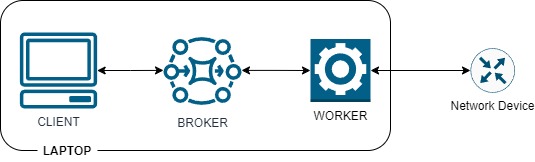
Client, broker and worker all should be able to run on same machine Windows, Linux or MAC.
First, install NorFab using pip:
pip install norfab
pip install norfab[nfcli]
pip install norfab[nornirservice]
Above installs NorFab core components plus extras needed to run nfcli anf Nornir service workers.
Once NorFab installed, next step is to create a folder that will hold your environment. Run this command to create NorFab folders and files:
nfcli --create-env norfab
This will create norfab folder and inside of it will create inventory.yaml, file name is important as NORFAB by default searches for inventory.yaml, file content is:
broker: # (1)!
  endpoint: "tcp://127.0.0.1:5555" # (2)!

workers: # (3)!
  nornir-*: # (4)!
    - nornir/common.yaml
  nornir-worker-1: # (5)!
    - nornir/nornir-worker-1.yaml

topology: # (6)!
  broker: True # (7)!
  workers: # (8)!
    - nornir-worker-1
- Broker configuration inventory section
- URL to listen for connections on -
localhostport5555in this case - Workers configuration inventory section
- glob pattern that will match all workers with
nornir-in the name and mapcommon.yamlfile content for each of them - Worker definition to map inventory file to a specific worker that has name
nornir-worker-1 - Topology section to define what components to run
- Start broker process
- List of workers names to start processes for
Command --create-env assumes we are working with Nornir service and creates nornir folder and inside of it creates two files. First file common.yaml to host configuration common for all Nornir service workers:
service: nornir # (1)!
broker_endpoint: "tcp://127.0.0.1:5555" # (2)!

# Nornir inventory and configuration
runner: # (3)!
  plugin: RetryRunner
hosts: {}
default: {} # (4)!
groups: {} # (5)!
- Name of the service this worker hosting
- Broker URL to initiate connections with
- Nornir runner plugin configuration
- Nornir
defaultdata section - Nornir groups definition section
Second file specific to the worker with name nornir-worker-1 which holds Nornir inventory data:
hosts:
  ios-device-1:
    hostname: 192.168.1.1
    platform: cisco_ios
    username: admin
    password: admin
This is how files structure will look like:
└───norfab
    │   inventory.yaml
    │
    └───nornir
            common.yaml
            nornir-worker-1.yaml
Now you are ready to start NorFab Interactive Command Line Shell Client. Open terminal window, navigate to the folder where inventory.yaml located and start NFCLI:
C:\>cd norfab
C:\norfab>nfcli
nf#
this will start the NorFab broker process, Nornir worker process, instantiate
NFCLI client and drop you into interactive command line shell 
nf#? # (1)!
 file      File sharing service
 netbox    Netbox service
 nornir    Nornir service
 show      NorFab show commands
 exit      Exit current shell
 help      Print help message
 pwd       Print current shell path
 top       Exit to top shell
nf#show norfab broker workers # (2)!
 name             service  status  holdtime  keepalives tx/rx  alive (s)
 nornir-worker-1  nornir   alive   12.8      58 / 58           149
nf#
nf#nornir # (3)!
nf[nornir]#?
 cfg     Configure devices over CLI interface
 cli     Send CLI commands to devices
 show    Show Nornir service parameters
 task    Run Nornir task
 test    Run network tests
 end     Exit application
 exit    Exit current shell
 help    Print help message
 pwd     Print current shell path
 top     Exit to top shell
nf[nornir]#top
nf#show nornir hosts table details
+-----------------+--------------+------------+-------------+--------+----------+------------+
| worker          | host         | platform   | hostname    | port   | groups   | username   |
+=================+==============+============+=============+========+==========+============+
| nornir-worker-1 | ios-device-1 | cisco_ios  | 192.168.1.1 | None   | []       | admin      |
+-----------------+--------------+------------+-------------+--------+----------+------------+
nf# end
Exiting...
- Question mark plus enter to print commands help
- Run show command
- Drop into Nornir Service command shell
NorFab CLI supports Tab completions, question mark help together with sub-shells, read more about NorFab CLI and how to use it here.
Getting started with the Python API¤
You can also start NorFab from Python with an inventory dictionary instead of YAML
files. Install norfab[nornirservice] as shown above, save this script as
getting_started.py, and run python getting_started.py.
The script starts a local broker and Nornir worker, lists workers and host details
like the NFCLI commands above, then shuts everything down. Listing inventory does
not connect to the device. Replace the example device settings before running
network automation tasks. Port 5555 must be available; runtime files are created
under __norfab__ in the current working directory.
from pprint import pprint

from norfab.core.nfapi import NorFab


def main():
    inventory = {
        "broker": {"endpoint": "tcp://127.0.0.1:5555"},
        "workers": {
            "nornir-worker-1": [
                {
                    "service": "nornir",
                    "runner": {"plugin": "RetryRunner"},
                    "hosts": {
                        "ios-device-1": {
                            "hostname": "192.168.1.1",
                            "platform": "cisco_ios",
                            "username": "admin",
                            "password": "admin",
                        }
                    },
                }
            ]
        },
        "topology": {"broker": True, "workers": ["nornir-worker-1"]},
    }
    nf = NorFab(inventory_data=inventory)
    try:
        nf.start()
        client = nf.make_client()

        # Equivalent to: show norfab broker workers
        pprint(client.mmi("mmi.service.broker", "show_workers"))

        # Equivalent to: show nornir hosts table details
        pprint(
            client.run_job(
                service="nornir",
                task="get_nornir_hosts",
                workers="nornir-worker-1",
                kwargs={"details": True},
            )
        )
    finally:
        nf.destroy()


# Required when starting worker processes on Windows and macOS.
if __name__ == "__main__":
    main()
The with statement starts NorFab and creates its client. Leaving the block
automatically shuts NorFab down, including when commands raise an exception.
from pprint import pprint

from norfab.core.nfapi import NorFab


def main():
    inventory = {
        "broker": {"endpoint": "tcp://127.0.0.1:5555"},
        "workers": {
            "nornir-worker-1": [
                {
                    "service": "nornir",
                    "runner": {"plugin": "RetryRunner"},
                    "hosts": {
                        "ios-device-1": {
                            "hostname": "192.168.1.1",
                            "platform": "cisco_ios",
                            "username": "admin",
                            "password": "admin",
                        }
                    },
                }
            ]
        },
        "topology": {"broker": True, "workers": ["nornir-worker-1"]},
    }
    with NorFab(inventory_data=inventory) as nf:
        client = nf.client

        # Equivalent to: show norfab broker workers
        pprint(client.mmi("mmi.service.broker", "show_workers"))

        # Equivalent to: show nornir hosts table details
        pprint(
            client.run_job(
                service="nornir",
                task="get_nornir_hosts",
                workers="nornir-worker-1",
                kwargs={"details": True},
            )
        )


# Required when starting worker processes on Windows and macOS.
if __name__ == "__main__":
    main()
Worker configuration dictionaries go inside a list, just like file paths in the
YAML inventory. run_job() returns results keyed by worker name, including the
result, failed, and errors fields. pprint() displays those results directly
instead of formatting an NFCLI table.
 That's it
Where to go next? Checkout tutorials section or read about NORFAB concepts.